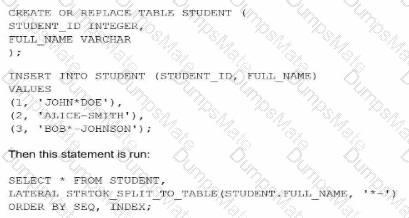
To determine the correct output, a Data Analyst must understand the behavior of the STRTOK_SPLIT_TO_TABLE table function and how it interacts with different delimiters.
1. Functionality of STRTOK_SPLIT_TO_TABLE:
The STRTOK_SPLIT_TO_TABLE function tokenizes a string based on a set of specified delimiters. Unlike simple SPLIT functions that often look for a literal string as a delimiter, STRTOK treats the delimiter string as a set of individual characters. Any character present in the delimiter string will trigger a split. Crucially, it skips empty tokens—if multiple delimiters appear consecutively, it does not produce a row for the space between them.
2. Evaluating the Data and Delimiters ('*-'):
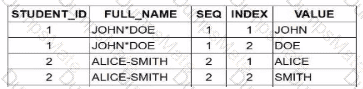
'JOHN*DOE': The * character is a delimiter. This results in two tokens: JOHN and DOE.
'ALICE-SMITH': The - character is a delimiter. This results in two tokens: ALICE and SMITH.
'BOB*-JOHNSON': Both * and - are delimiters. Because they appear consecutively (*-), the function splits at each but ignores the empty space between them. This results in two tokens: BOB and JOHNSON.
3. Analyzing the Resulting Rows:
The LATERAL join produces a row for every token generated. The columns SEQ (identifying the source row sequence) and INDEX (position of the token within that sequence) are used for sorting.
Student 1: 2 tokens (JOHN, DOE) $\rightarrow$ 2 rows.
Student 2: 2 tokens (ALICE, SMITH) $\rightarrow$ 2 rows.
Student 3: 2 tokens (BOB, JOHNSON) $\rightarrow$ 2 rows.
Evaluating the Options (image_8233d8.png):
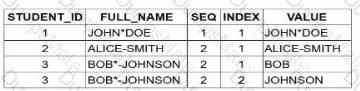
Option A incorrectly only shows results for Student 3.
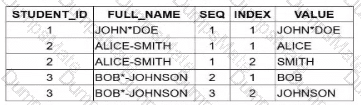
Option C incorrectly implies Student 1 and 2 produce three tokens each.
Option D incorrectly interprets the consecutive delimiters in Student 3's name as creating a different sequence count.
Option B is the 100% correct result set. It accurately shows that each student’s name is split into exactly two parts, properly handling the varying delimiters and the consecutive characters in the third record.