Summer Sale - 70% Discount Offer - Ends in 0d 00h 00m 00s - Coupon code: dm70dm

MD-102 Endpoint Administrator Questions and Answers

Questions 4

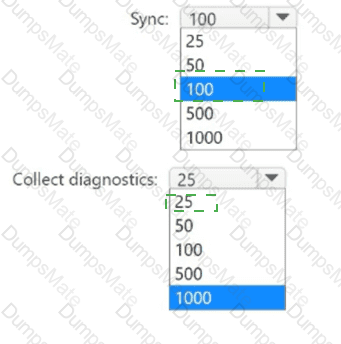
You manage 1.000 devices by using Microsoft Intune. You review the Device compliance trends report. For how long will the report display trend data?

Options:

A.

30 days

B.

60 days

C.

90 days

D.

365 days

Buy Now
Questions 5

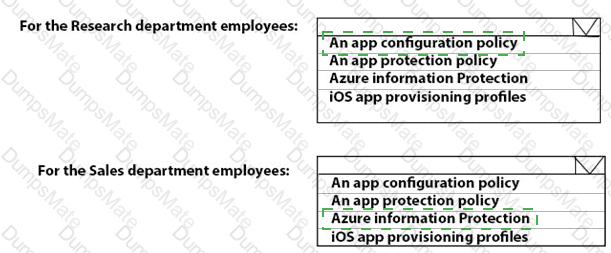
What should you use to meet the technical requirements for Azure DevOps?

Options:

A.

An app protection policy

B.

Windows Information Protection (WIP)

C.

Conditional access

D.

A device configuration profile

Buy Now

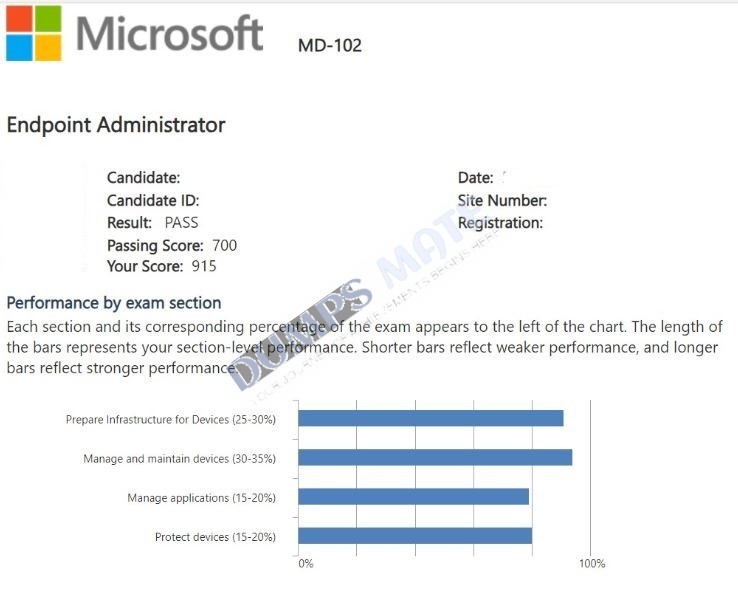
MD-102 Report Card

Questions 6

You have an on-premises Active Directory domain that syncs to Azure AD tenant.

The tenant contains computers that run Windows 10. The computers are hybrid Azure AD joined and enrolled in Microsoft Intune. The Microsoft Office settings on the computers are configured by using an Group Policy Object (GPO).

You need to migrate the GPO to Intune.

Which three actions should you perform in sequence? To answer, move the appropriate actions from the list of actions to the answer area and arrange them in the correct order.

MD-102 Question 6

Options:

Buy Now
Questions 7

You have a Microsoft 365 ES subscription.

You use Microsoft Intune to manage all devices.

You need to prepare a Win32 app named Appl.exe for deployment.

What should you do first?

Options:

A.

From the Microsoft Intune admin center, create an app configuration policy.

B.

Change App1.exe to the INIUNEW1N format.

C.

From the Microsoft 365 Apps admin center, create a deployment configuration

D.

Upload App1 exe to Azure Blob Storage.

Buy Now
Questions 8

You have a Microsoft Intune subscription that has the following device compliance policy settings:

Mark devices with no compliance policy assigned as: Compliant

Compliance status validity period (days): 14

On January 1, you enroll Windows 10 devices in Intune as shown in the following table.
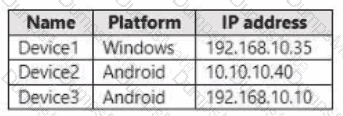
MD-102 Question 8

On January 4, you create the following two device compliance policies:

Name: Policy1

Platform: Windows 10 and later

Require BitLocker: Require

Mark device noncompliant: 5 days after noncompliance

Scope (Tags): Tag1

Name: Policy2

Platform: Windows 10 and later

Firewall: Require

Mark device noncompliant: Immediately

Scope (Tags): Tag2

On January 5, you assign Policy1 and Policy2 to Group1.

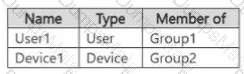
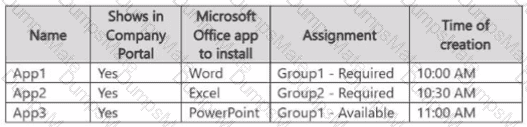
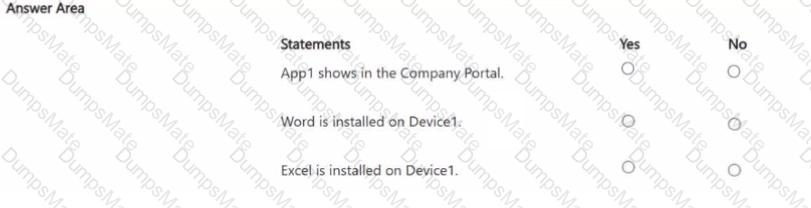
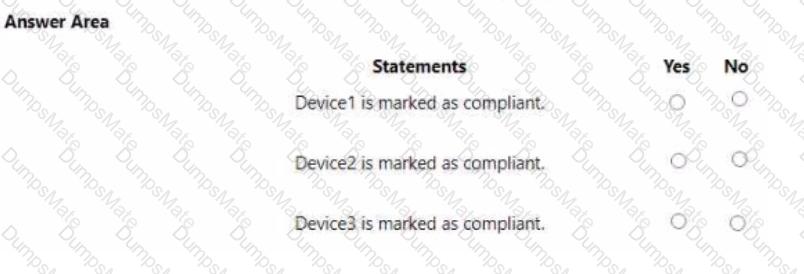
For each of the following statements, select Yes if the statement is true. Otherwise, select No.

NOTE: Each correct selection is worth one point.
MD-102 Question 8

Options:

Buy Now
Questions 9

You have a Microsoft Entra tenant named contoso.com that contains the users shown in the following table.

MD-102 Question 9

You purchase the devices shown in the following table.

MD-102 Question 9

Administrators perform the following actions:

• Join Device1 to contoso.com by using the credentials of Admin1.

• Register Device2 in contoso.com by using the credentials of Admin2.

For each of the following statements, select Yes if the statement is true. Otherwise, select No.

NOTE: Each correct selection is worth one point.

MD-102 Question 9

Options:

Buy Now
Questions 10

You have a Microsoft 365 subscription that contains the devices shown in the following table.

MD-102 Question 10

You need to ensure that only devices running trusted firmware or operating system build can access network resources.

Which compliance policy setting should you configure for each device? To answer, drag the appropriate settings to the correct devices. Each setting may be used once, more than once, or not at all. You may need to drag the split bar between panes or scroll to view content.

NOTE: Each correct selection is worth one point.

MD-102 Question 10

Options:

Buy Now
Questions 11

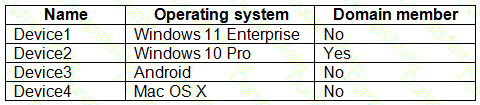
You have the devices shown in the following table.

MD-102 Question 11

You plan to implement Microsoft Defender for Endpoint.

You need to identify which devices can be onboarded to Microsoft Defender for Endpoint.

What should you identify?

Options:

A.

Device1 only

B.

Device2 only

C.

Device1, Device2 only

D.

Device1, Device2, and Device3 only

E.

Device1, Device2, Device3, and Device4

Buy Now
Questions 12

You have a Microsoft 365 subscription.

You need provide a user the ability to disable Security defaults and principle of least privilege.

Which role should you assign to the user?

Options:

A.

Global Administrator

B.

Conditional Access Administrator

C.

Security Administrator

D.

Intune Administrator

Buy Now
Questions 13

Your network contains an on-premises Active Directory domain that contains the locations shown in the following table.

MD-102 Question 13

In Microsoft Intune, you enroll the Windows 10 devices shown in the following table.

MD-102 Question 13

You have a Delivery Optimization device configuration profile applied to all the devices. The profile is configured as shown in the following exhibit.

MD-102 Question 13

From which devices can Device1 and Device2 get updates? To answer, select the appropriate options in the answer area.

NOTE: Each correct selection is worth one point.

MD-102 Question 13

Options:

Buy Now
Questions 14

You use Windows Admin Center to remotely administer computers that run Windows 10.

When connecting to Windows Admin Center, you receive the message shown in the following exhibit.

MD-102 Question 14

You need to prevent the message from appearing when you connect to Windows Admin Center.

To which certificate store should you import the certificate?

Options:

A.

Personal

B.

Trusted Root Certification Authorities

C.

Client Authentication Issuers

Buy Now
Questions 15

You have a Microsoft 365 E5 subscription that contains a group named Group1.

You create a Conditional Access policy named CAPolicy1 and assign CAPolicy1 to Group1.

You need to configure CAPolicy1 to require the members of Group1 to reauthenticate every eight hours when they connect to Microsoft Exchange Online.

What should you configure?

Options:

A.

Session access controls

B.

an assignment that uses a User risk condition

C.

an assignment that uses a Sign-in risk condition

D.

Grant access controls

Buy Now
Questions 16

Your network contains an Active Directory domain.

You deploy a Microsoft Entra tenant.

Another administrator configures the domain to synchronize to the Microsoft Entra tenant.

You discover that 10 user accounts in an organizational unit (OU) are NOT synchronized to the Microsoft Entra tenant. All the other user accounts synchronized successfully.

You review Microsoft Entra Connect Health and discover that all the user account synchronizations completed successfully.

You need to ensure that the 10 user accounts are synchronized to the Microsoft Entra tenant.

Solution: From the Synchronization Rules Editor, you create a new outbound synchronization rule.

Does this meet the goal?

Options:

A.

Yes

B.

No

Buy Now
Questions 17

You have a Microsoft 365 ES subscription that uses Microsoft Intune.

Devices are enrolled in Intune as shown in the following table.

MD-102 Question 17

The devices are the members of groups as shown in the following table.

MD-102 Question 17

You create an JOS/iPadOS update profile as shown in the following exhibit.

MD-102 Question 17

For each of the following statements, select Yes if the statement is true. Otherwise, select No.

NOTE: Each correct selection is worth one point.

MD-102 Question 17

Options:

Buy Now
Questions 18

You plan to deploy Windows 11 Pro to 200 new computers by using the Microsoft Deployment Toolkit (MDT) and Windows Deployment Services (WDS).

The company has a Volume Licensing Agreement and uses a product key to activate Windows 11.

You need to ensure that the new computers will be configured to have the correct product key during the installation.

What should you configure?

Options:

A.

an MDT task sequence

B.

the Device settings in Azure AD

C.

a WDS boot image

D.

a Windows Autopilot deployment profile

Buy Now
Questions 19

You have a Microsoft Deployment Toolkit (MDT) deployment shore.

You plan to deploy Windows 11 by using the Standard Client Task Sequence template.

You need to modify the task sequence to perform the following actions:

• Format disks to support Unified Extensible Firmware Interface (UEFl).

• Create a recovery partition.

Which phase of the Task sequence should you modify?

Options:

A.

Preinstall

B.

Install

C.

Initialization

D.

Post Install

Buy Now
Questions 20

You have a Microsoft 365 tenant that uses Microsoft Intune and contains the devices shown in the following table.

MD-102 Question 20

In Microsoft Intune Endpoint security, you need to configure a disk encryption policy for each device.

Which encryption type should you use for each device, and which role-based access control (RBAQ role in Intune should you use to manage the encryption keys? To answer, select the appropriate options m the answer area.

NOTE: Each correct selection is worth one point.

MD-102 Question 20

Options:

Buy Now
Questions 21

You have a Microsoft 365 E5 subscription that contains devices enrolled in Microsoft Intune. You need to review security tasks in the Microsoft Intune admin center. What should you do first?

Options:

A.

Implement the Mobile Threat Defense connector.

B.

Integrate Intune with Microsoft Defender for Endpoint.

C.

Deploy an attack surface reduction (ASR) policy.

D.

Implement the ServiceNow connector.

E.

Deploy an Intune security baseline for Microsoft Defender for Endpoint.

Buy Now
Questions 22

You have a Microsoft 36S subscription, use Microsoft Intune. and have the users shown in the following table.

MD-102 Question 22

You create a policy set named Set1 as shown in the exhibit. (Click the Exhibit tab.)

MD-102 Question 22

Users have enrolled devices in Intune as shown in the following table.

MD-102 Question 22

For each of the following statements, select Yes if the statement is true. Otherwise, select No.

NOTE: Each correct selection is worth on* point.

MD-102 Question 22

Options:

Buy Now
Questions 23

You have an Azure AD group named Group1. Group! contains two Windows 10 Enterprise devices named Device1 and Device2. You create a device configuration profile named Profile1. You assign Profile! to Group1. You need to ensure that Profile! applies to Device1 only. What should you modify in Profile 1?

Options:

A.

Assignments

B.

Settings

C.

Scope (Tags)

D.

Applicability Rules

Buy Now
Questions 24

You have a Microsoft Deployment Toolkit (MDT) server named MDT1.

When computers start from the LiteTouchPE_x64.lso image and connect to MDT1. the welcome screen appears as shown In the following exhibit.

MD-102 Question 24

You need to prevent the welcome screen from appearing when the computers connect to MDT1.

Which three actions should you perform in sequence? To answer move the appropriate actions from the list of actions to the answer area and arrange them in the correct order.

MD-102 Question 24

Options:

Buy Now
Questions 25

You have a Microsoft 365 E5 subscription that contains 500 macOS devices enrolled in Microsoft Intune.

You need to ensure that you can apply Microsoft Defender for Endpoint antivirus policies to the macOS devices. The solution must minimize administrative effort.

What should you do?

Options:

A.

From the Microsoft Endpoint Manager admin center, create a configuration profile.

B.

From the Microsoft Endpoint Manager admin center, create a security baseline.

C.

Onboard the macOS devices to the Microsoft 365 compliance center.

D.

Install Defender for Endpoint on the macOS devices.

Buy Now
Questions 26

You have a Microsoft 365 tenant that contains the objects shown in the following table.

MD-102 Question 26

You are creating a compliance policy named Compliance1.

Which objects can you specify in Compliance1 as additional recipients of noncompliance notifications?

Options:

A.

Group3 and Group4 only

B.

Group3, Group4, and Admin1 only

C.

Group1, Group2, and Group3 only

D.

Group1, Group2, Group3, and Group4 only

E.

Group1, Group2, Group3, Group4, and Admin1

Buy Now
Questions 27

You use Microsoft Defender for Endpoint to protect computers that run Windows 10.

You need to assess the differences between the configuration of Microsoft Defender for Endpoint and the Microsoft-recommended configuration baseline.

Which tool should you use?

Options:

A.

Microsoft Defender for Endpoint Power 81 app

B.

Microsoft Secure Score

C.

Endpoint Analytics

D.

Microsoft 365 Defender portal

Buy Now
Questions 28

You have a Microsoft 365 subscription that uses Microsoft Intune Suite. You use Microsoft Intune to manage devices. Azure AD joined Windows devices enroll automatically in Intune. You have the devices shown in the following table.

MD-102 Question 28

You are preparing to upgrade the devices to Windows 11. All the devices are compatible with Windows 11.

You need to evaluate Windows Autopilot and in-place upgrade as deployment methods to implement Windows 11 Pro on the devices, while retaining all user settings and applications.

Which devices can be upgraded by using each method? To answer, select the appropriate options in the answer area.

NOTE: Each correct selection is worth one point.

MD-102 Question 28

Options:

Buy Now
Questions 29

You have a Microsoft 365 E5 subscription that includes Microsoft Intune.

You need to configure a compliance policy for the iOS/iPadOS platform. The solution must meet the following requirements:

• Require jailbroken devices to be marked as noncompliant.

• Mark devices without a password lock as noncompliant.

Which compliance policy settings should you configure for each requirement? To answer, select the appropriate options in the answer area.

NOTE: Each correct selection is worth one point.

MD-102 Question 29

Options:

Buy Now
Questions 30

You have a Microsoft 365 subscription.

You have 10 computers that run Windows 10 and are enrolled in mobile device management (MDM).

You need to deploy the Microsoft 36S Apps for enterprise suite to all the computers.

What should you do?

Options:

A.

From the Microsoft Intune admin center, create a Windows 10 device profile.

B.

From Azure AD, add an app registration.

C.

From Azure AD. add an enterprise application.

D.

From the Microsoft Intune admin center, add an app.

Buy Now
Questions 31

You have a Microsoft 365 subscription that uses Microsoft Intune Suite.

You use Microsoft Intune to manage devices.

You have a Windows 11 device named Device1 that is enrolled in Intune. Device1 has been offline for 30 days.

You need to remove Device1 from Intune immediately. The solution must ensure that if the device checks in again, any apps and data provisioned by Intune are removed. User-installed apps, personal data, and OEM-installed apps must be retained.

What should you use?

Options:

A.

a Delete action

B.

a Retire action

C.

a Fresh Start action

D.

an Autopilot Reset action

Buy Now
Questions 32

You have a Microsoft 365 E5 subscription.

All Windows devices are enrolled in Microsoft Intune.

You need to deploy the Remote Help app to all the devices.

The solution must minimize administrative effort.

Which type of app should you deploy?

Options:

A.

Windows app (Win32)

B.

Microsoft Store

C.

line-of-business (LOB)

D.

Microsoft 365

Buy Now
Questions 33

Your company standardizes on Windows 10 Enterprise for all users.

Some users purchase their own computer from a retail store. The computers run Windows 10 Pro.

You need to recommend a solution to upgrade the computers to Windows 10 Enterprise, join the computers to Azure AD, and install several Microsoft Store apps. The solution must meet the following

requirements:

• Ensure that any applications installed by the users are retained.

• Minimize user intervention.

What is the best recommendation to achieve the goal?

More than one answer choice may achieve the goal.

Select the BEST answer.

Options:

A.

Windows Autopilot

B.

Microsoft Deployment Toolkit (MDT)

C.

a Windows Configuration Designer provisioning package

D.

Windows Deployment Services (WDS)

Buy Now
Questions 34

You need to capture the required information for the sales department computers to meet the technical

requirements.

Which Windows PowerShell command should you run first?

Options:

A.

Install-Module WindowsAutoPilotIntune

B.

Install-Script Get-WindowsAutoPilotInfo

C.

Import-AutoPilotCSV

D.

Get-WindowsAutoPilotInfo

Buy Now
Questions 35

What should you upgrade before you can configure the environment to support co-management?

Options:

A.

the domain functional level

B.

Configuration Manager

C.

the domain controllers

D.

Windows Server Update Services (WSUS)

Buy Now
Questions 36

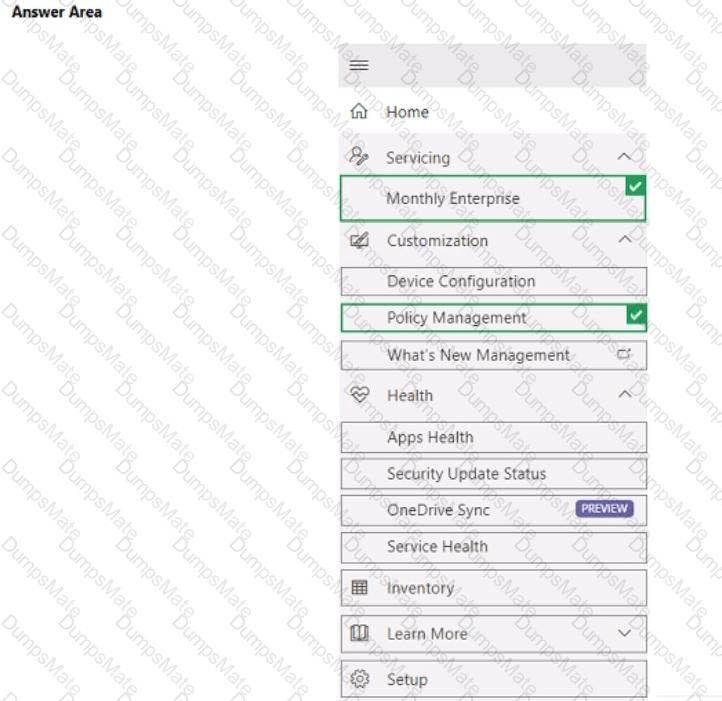
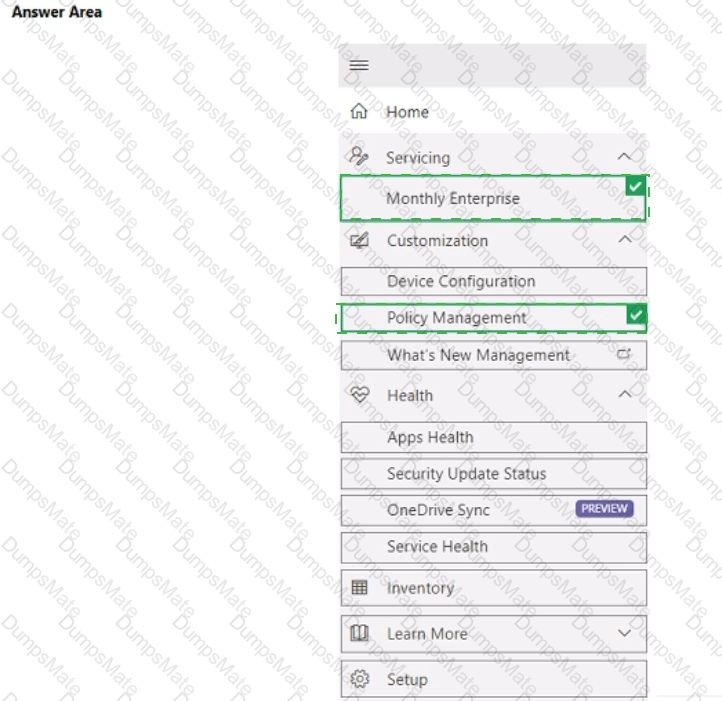
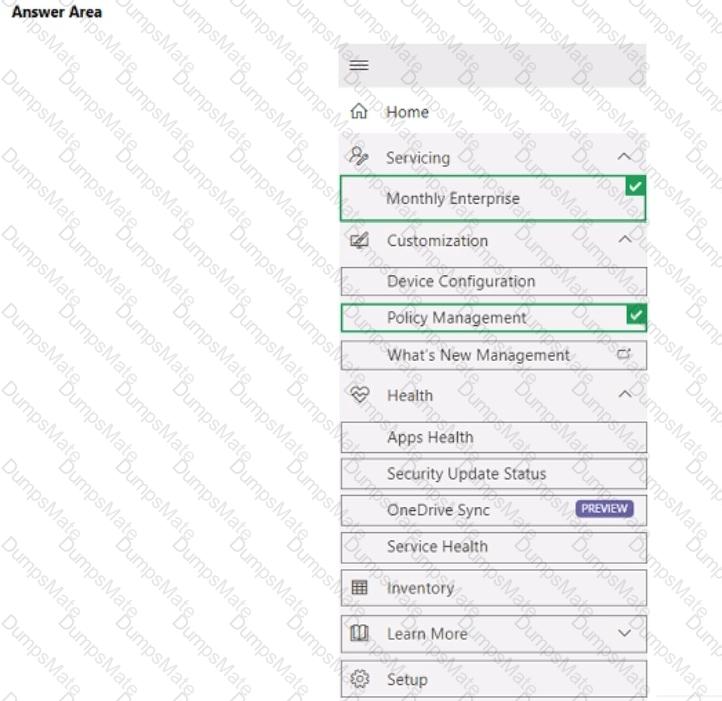
You need to recommend a solution to meet the device management requirements.

What should you include in the recommendation? To answer, select the appropriate options in the answer area.

NOTE: Each correct selection is worth one point.

MD-102 Question 36

Options:

Buy Now
Questions 37

What should you configure to meet the technical requirements for the Azure AD-joined computers?

Options:

A.

Windows Hello for Business from the Microsoft Intune blade in the Azure portal.

B.

The Accounts options in an endpoint protection profile.

C.

The Password Policy settings in a Group Policy object (GPO).

D.

A password policy from the Microsoft Office 365 portal.

Buy Now
Questions 38

You need to meet the technical requirements for Windows AutoPilot.

Which two settings should you configure from the Azure Active Directory blade? To answer, select the appropriate settings in the answer area.

NOTE: Each correct selection is worth one point.

MD-102 Question 38

Options:

Buy Now
Questions 39

You need to meet the device management requirements for the developers.

What should you implement?

Options:

A.

folder redirection

B.

Enterprise State Roaming

C.

home folders

D.

known folder redirection in Microsoft OneDrive

Buy Now
Questions 40

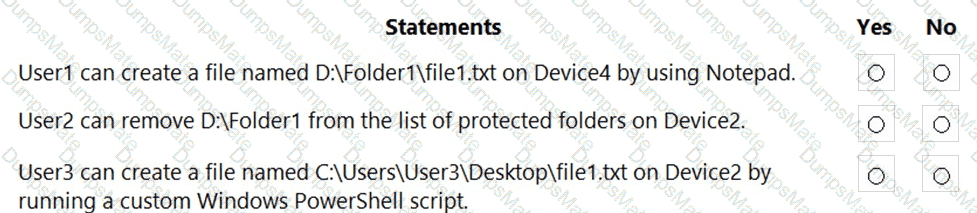
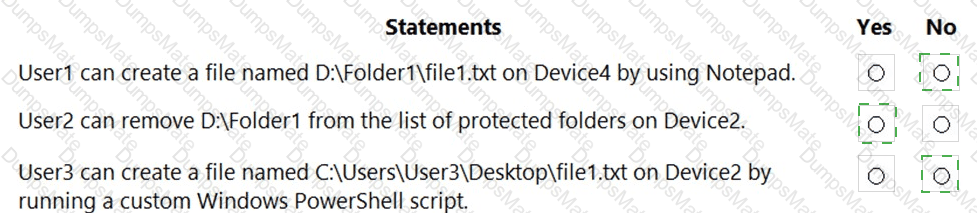
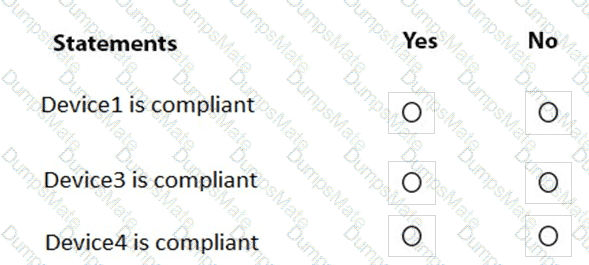
For each of the following statements, select Yes if the statement is true. Otherwise, select No.

NOTE: Each correct selection is worth one point.
MD-102 Question 40

Options:

Buy Now
Questions 41

You implement Boundary1 based on the planned changes.

Which devices have a network boundary of 192.168.1.0/24 applied?

Options:

A.

Device2 only

B.

Device3 only

C.

Device 1. Device2. and Device5 only

D.

Device 1, Device2, Device3, and Device4 only

Buy Now
Questions 42

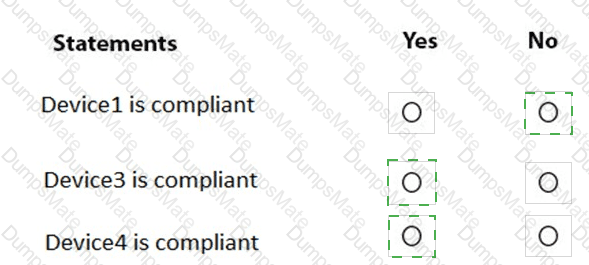
For each of the following statements, select Yes if the statement is true. Otherwise, select No.

NOTE: Each correct selection is worth one point.
MD-102 Question 42

Options:

Buy Now
Questions 43

User1 and User2 plan to use Sync your settings.

On which devices can the users use Sync your settings? To answer, select the appropriate options in the answer area.

NOTE: Each correct selection is worth one point.

MD-102 Question 43

Options:

Buy Now
Questions 44

For each of the following statements, select Yes if the statement is true. Otherwise, select No. NOTE: Each correct selection is worth one point.
MD-102 Question 44

Options:

Buy Now
Questions 45

Which devices are registered by using the Windows Autopilot deployment service?

Options:

A.

Device1 only

B.

Device3 only

C.

Device1 and Device3 only

D.

Device1, Device2, and Device3

Buy Now
Questions 46

You need to ensure that computer objects can be created as part of the Windows Autopilot deployment. The solution must meet the technical requirements.

To what should you grant the right to create the computer objects?

Options:

A.

Server2

B.

Server1

C.

GroupA

D.

DC1

Buy Now
Questions 47

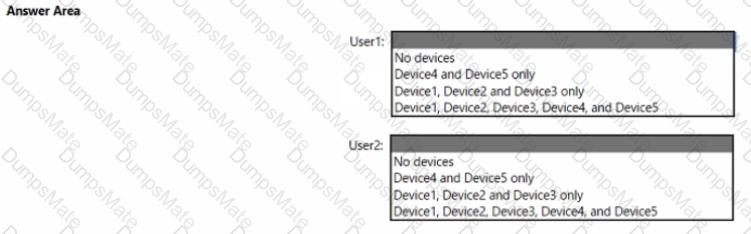
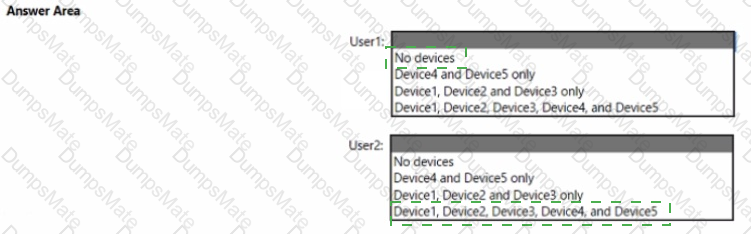
You implement the planned changes for Connection1 and Connection2

How many VPN connections will there be for User1 when the user signs in to Device 1 and Devke2? To answer select the appropriate options in the answer area.

NOTE; Each correct selection is worth one point.

MD-102 Question 47

Options:

Buy Now
Questions 48

Which users can purchase and assign App1?

Options:

A.

User3 only

B.

User1 and User3 only

C.

User1, User2, User3, and User4

D.

User1, User3, and User4 only

E.

User3 and User4 only

Buy Now
Questions 49

Which user can enroll Device6 in Intune?

Options:

A.

User4 and User2 only

B.

User4 and User 1 only

C.

User1, User2, User3, and User4

D.

User4. User Land User2 only

Buy Now
Questions 50

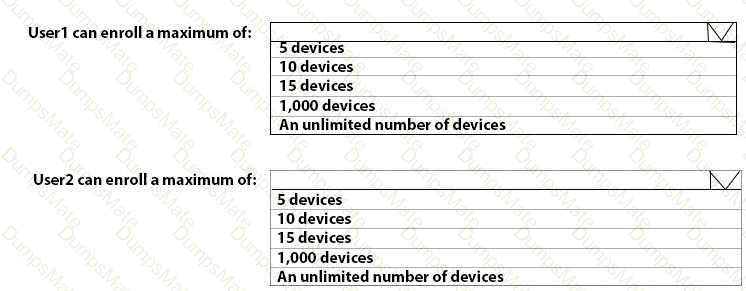
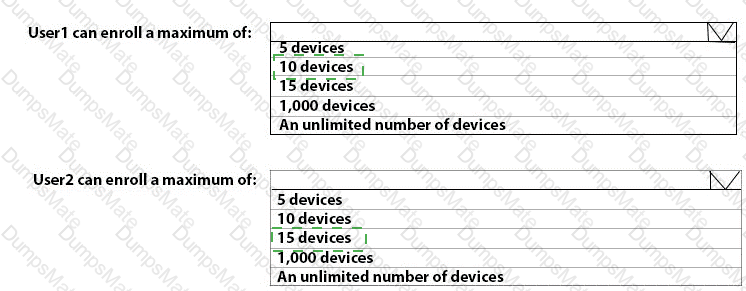
What is the maximum number of devices that User1 and User2 can enroll in Intune? To answer, select the appropriate options in the answer area.

NOTE: Each correct selection is worth one point.

MD-102 Question 50

Options:

Buy Now
Questions 51

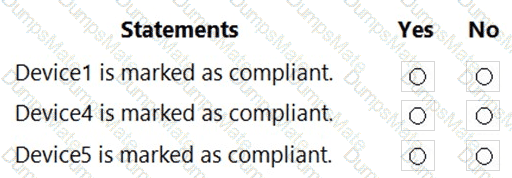
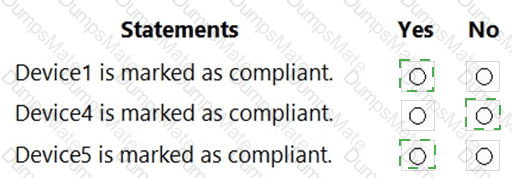
You are evaluating which devices are compliant.

For each of the following statements, select Yes if the statement is true. Otherwise, select No.

NOTE: Each correct selection is worth one point.
MD-102 Question 51

Options:

Buy Now
Questions 52

You need to meet the technical requirements for the iOS devices.

Which object should you create in Intune?

Options:

A.

A compliance policy

B.

An app protection policy

C.

A Deployment profile

D.

A device configuration profile

Buy Now
Questions 53

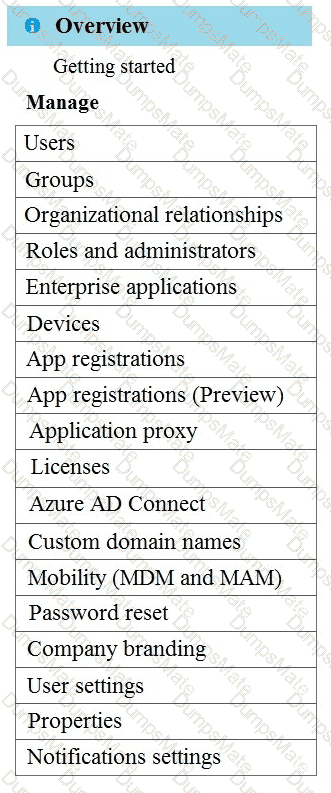
To which devices do Policy1 and Policy2 apply? To answer, select the appropriate options in the answer area.

NOTE: Each correct selection is worth one point.
MD-102 Question 53

Options:

Buy Now
Questions 54

You need to prepare for the deployment of the Phoenix office computers.

What should you do first?

Options:

A.

Extract the hardware ID information of each computer to a CSV file and upload the file from the Devices settings in Microsoft Store for Business.

B.

Generalize the computers and configure the Mobility (MDM and MAM) settings from the Azure ActiveDirectory blade in the Azure portal.

C.

Generalize the computers and configure the Device settings from the Azure Active Directory blade in the Azure portal.

D.

Extract the hardware ID information of each computer to an XLSX file and upload the file from the Devices settings in Microsoft Store for Business.

Buy Now
Questions 55

You need to meet the technical requirements for the LEG department computers.

Which three actions should you perform in sequence? To answer, move the appropriate actions from the list of actions to the answer area and arrange them in the correct order.

MD-102 Question 55

Options:

Buy Now
Questions 56

You need to meet the technical requirements for the IT department.

What should you do first?

Options:

A.

From the Azure Active Directory blade in the Azure portal, enable Seamless single sign-on.

B.

From the Configuration Manager console, add an Intune subscription.

C.

From the Azure Active Directory blade in the Azure portal, configure the Mobility (MDM and MAM) settings.

D.

From the Microsoft Intune blade in the Azure portal, configure the Windows enrollment settings.

Buy Now
Questions 57

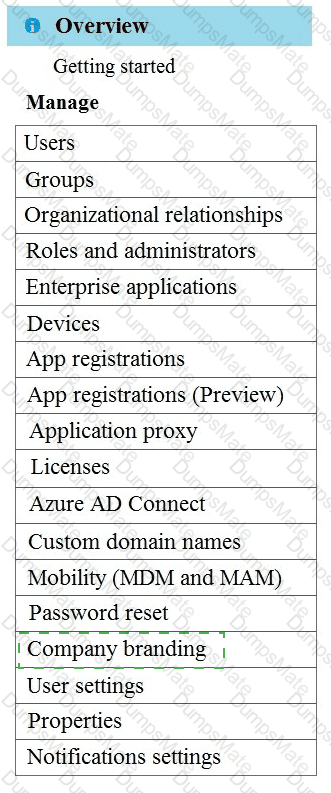
You need a new conditional access policy that has an assignment for Office 365 Exchange Online.

You need to configure the policy to meet the technical requirements for Group4.

Which two settings should you configure in the policy? To answer, select the appropriate settings in the answer area.

NOTE: Each correct selection is worth one point.
MD-102 Question 57

Options:

Buy Now
Questions 58

You need to meet the requirements for the MKG department users.
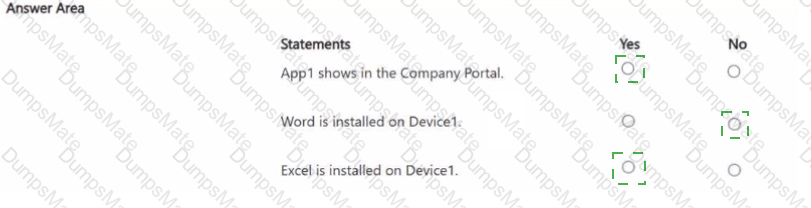
What should you do?

Options:

A.

Assign the MKG department users the Purchaser role in Microsoft Store for Business

B.

Download the APPX file for App1 from Microsoft Store for Business

C.

Add App1 to the private store

D.

Assign the MKG department users the Basic Purchaser role in Microsoft Store for Business

E.

Acquire App1 from Microsoft Store for Business

Buy Now
Questions 59

You need to prepare for the deployment of the Phoenix office computers.

What should you do first?

Options:

A.

Generalize the computers and configure the Mobility (MDM and MAM) settings from the Azure Active Directory admin center.

B.

Extract the hardware ID information of each computer to a CSV file and upload the file from the Microsoft Intune blade in the Azure portal.

C.

Extract the hardware ID information of each computer to an XML file and upload the file from the Devices settings in Microsoft Store for Business.

D.

Extract the serial number information of each computer to a CSV file and upload the file from the Microsoft Intune blade in the Azure portal.

Buy Now
Exam Code: MD-102
Exam Name: Endpoint Administrator
Last Update: Jul 6, 2026
Questions: 392

PDF + Testing Engine

$52.5  $174.99

Testing Engine

$40.5  $134.99
buy now MD-102 testing engine

PDF (Q&A)

$34.5  $114.99
buy now MD-102 pdf
dumpsmate guaranteed to pass

24/7 Customer Support

DumpsMate's team of experts is always available to respond your queries on exam preparation. Get professional answers on any topic of the certification syllabus. Our experts will thoroughly satisfy you.

Site Secure

mcafee secure

TESTED 06 Jul 2026